
There’s a moment every small business owner knows. It’s 9pm on a Sunday. You’ve got a client invoice from three weeks ago that still hasn’t been reconciled, your bank feed is showing a transaction you don’t recognise, and somewhere — buried under a stack of delivery notes — is the receipt your accountant asked for in January. January.
If any of that feels familiar, this article is probably overdue.
Cloud accounting has genuinely changed how businesses manage their finances — not in a vague, tech-industry-hype sort of way, but in specific, measurable, “I got two hours of my Sunday back” sort of ways. Understanding how cloud accounting works isn’t about being tech-savvy. It’s about understanding what’s actually happening to your numbers, in real time, and why that matters more than most business owners realise until something goes wrong.
So What Actually Happens When You “Move to the Cloud”?
Strip away the jargon and cloud accounting is straightforward. Instead of your financial data living on a single computer — or worse, in a filing cabinet — it lives on remote servers accessible through a web browser or app. Your bank, your invoices, your expenses, your payroll figures: all of it syncs, updates, and becomes visible to anyone you give access to.
That last part is more significant than it sounds.
Traditional desktop accounting software — the kind that came on a CD-ROM and required an IT person to install — stored everything locally. When your accountant needed to look at something, you exported a file. Emailed it over. Waited. Got feedback. Made changes. Sent it back. The whole cycle could take days, and every time you exchanged files there was a new opportunity for the versions to get out of sync.
Cloud accounting works collapses that back-and-forth entirely. Your accountant sees exactly what you see, at the same moment, with no file transfers involved. For businesses working with firms like Ask Accountant — who offer dedicated cloud accounting support alongside their broader business accounting services — this kind of live visibility transforms how advice gets delivered. Instead of a quarterly review based on numbers from two months ago, your accountant can flag something the week it happens.
The Plumbing: Bank Feeds, Reconciliation, and Why They Matter
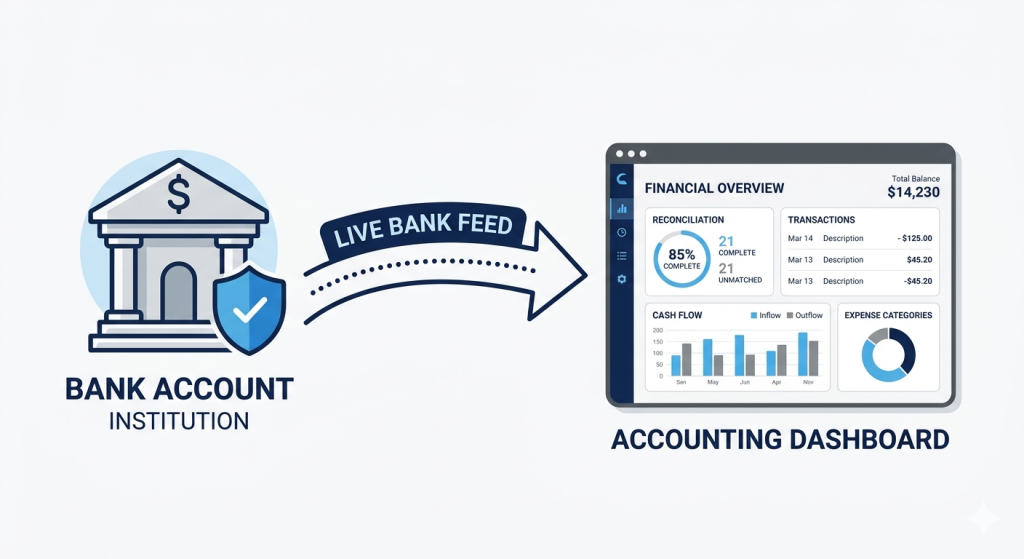
The bit that saves the most time — and the bit people underestimate — is the bank feed.
Most cloud accounting works platforms connect directly to your business bank account. Every transaction that hits your account appears automatically in your accounting software, usually within 24 hours. You’re not manually typing in payments. You’re not cross-referencing spreadsheets. The data arrives on its own, and your job becomes categorising rather than entering.
Reconciliation — matching your bank transactions to your recorded income and expenditure — used to be genuinely time-consuming. Still is, if you’re doing it the old way. With a live bank feed, the software often suggests matches automatically. You’re clicking “confirm” rather than hunting through ledger entries.
Quick reality check: Automated reconciliation isn’t magic. It still requires a human to review mismatches, flag duplicate entries, and handle anything unusual. But “reviewing and confirming” takes a fraction of the time that manual data entry does. Think 20 minutes weekly instead of a full afternoon monthly.
For businesses dealing with complex transaction volumes — construction firms managing CIS claims and refunds, for instance, or small retailers processing dozens of daily sales — this reduction in manual input is transformational.
How Cloud Accounting Works With HMRC’s Making Tax Digital Requirements
This isn’t optional reading anymore. HMRC’s Making Tax Digital (MTD) programme has been rolling out in stages, and for VAT-registered businesses it’s already mandatory. Income Tax Self Assessment under MTD is expanding further. The direction of travel is clear: paper records and manual submissions are being phased out.
Cloud accounting software — Xero, QuickBooks, FreeAgent, Sage, Kashflow — is built specifically to be MTD-compatible. They submit VAT returns directly to HMRC, maintain digital audit trails, and keep records in the format HMRC requires. Using compliant cloud software isn’t just convenient. For many businesses, it’s now a legal necessity.
If you’re still managing your VAT on spreadsheets and manually filling in HMRC’s portal, you’re either already non-compliant or you’re about to be. Worth checking your obligations sooner rather than later. Ask Accountant’s tax compliance team handles exactly this kind of transition for businesses that have left it a bit late.
A Comparison Worth Having
Here’s a realistic side-by-side of what changes when you switch:
| Task | Traditional Accounting | Cloud Accounting |
|---|---|---|
| Entering bank transactions | Manual data entry (hours per week) | Automatic via bank feed (minutes to review) |
| Sharing figures with your accountant | Export file → email → wait → version confusion | Live shared access — no file transfer needed |
| VAT return preparation | Manual calculation and portal submission | Auto-calculated, direct HMRC submission via MTD |
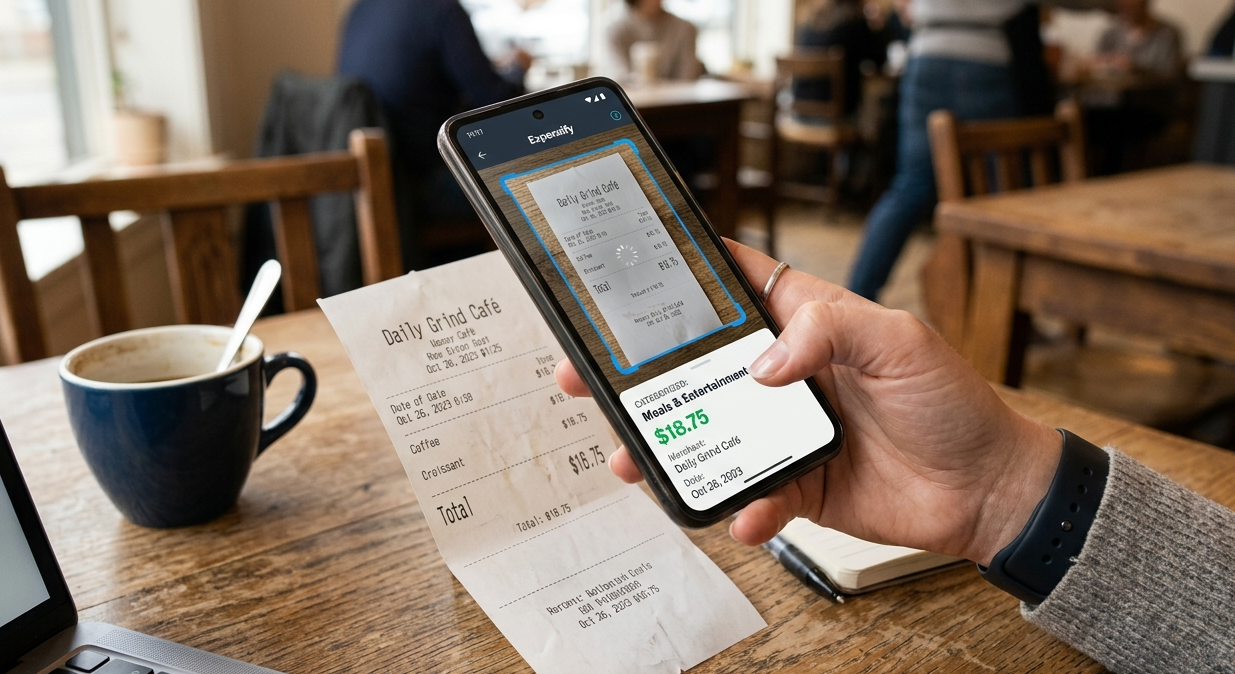
| Expense tracking | Paper receipts, spreadsheets, lost paperwork | Photo via mobile app → auto-categorised |
| Payroll | Separate software or manual processing | Integrated or directly linked — auto RTI submissions |
| Viewing cash position | Run end-of-month reports (always out of date) | Real-time dashboard — current to the day |
| Software backup | Manual backups (often forgotten) | Automatic, continuous — nothing to manage |
| Access from multiple devices | Tied to one machine | Any device, anywhere, any time |
The Time Saving Is Real — But It’s Not Always Where You Expect It
Most people assume the biggest time saving comes from automated data entry. And yes, that’s significant. But the hidden time saving is in the question-answering.
Think about how often you get asked: “Can you send me the figures for Q3?” or “What’s our current debtor balance?” or “How much VAT did we pay last quarter?” With traditional accounting, answering any of those questions means running reports, locating the right file, formatting it, and emailing it over. Ten minutes per question, minimum.
With cloud accounting, many of those questions answer themselves. Your accountant logs in. Your bookkeeper checks the dashboard. You pull up the app on your phone between meetings. The question is answered before it’s even finished being asked.
For business owners who use bookkeeping services alongside their accounts work, this kind of integration is particularly valuable. Rather than bookkeeping and accounting existing in separate silos — with information flowing awkwardly between them — cloud platforms make the two genuinely continuous. What the bookkeeper records, the accountant sees immediately. No gap, no translation, no data loss in transit.
What the Platforms Actually Do (Without the Sales Pitch)
Worth being clear-eyed about this. Cloud accounting platforms vary considerably, and they all have weaknesses.
Xero is arguably the most accountant-friendly. Excellent bank reconciliation, good third-party integrations, a clean interface. Can get expensive as you add users. Some businesses find the reporting a touch limited without add-ons.
QuickBooks Online is strong for small businesses and sole traders. HMRC-recognised for MTD, good mobile app, reasonably intuitive. Customer support has its critics.
FreeAgent is genuinely popular with freelancers and contractors. Simple, focused, doesn’t try to do everything. Integrates well with NatWest and RBS if you bank there.
Sage Business Cloud suits businesses that have been on Sage desktop and want to migrate without rebuilding everything from scratch. More complex than some rivals — which is either a feature or a problem, depending on your business.
None of these are magic. The software does the heavy lifting on data capture and reconciliation, but it doesn’t replace the thinking. That’s still your accountant’s job — interpreting the numbers, spotting the issues, making decisions.
Security: The Question Everyone Should Ask and Few People Do
Storing your financial data on someone else’s servers makes people nervous. Understandably. But the reality is that reputable cloud accounting providers invest significantly more in security infrastructure than the average small business ever would.
Think about it. Most small businesses back up their accounting data… occasionally. Maybe. Their desktop software isn’t encrypted. If someone walks out with the laptop, the data goes with it.
Cloud platforms use bank-grade encryption, two-factor authentication, automatic backups across multiple data centres, and full audit trails showing who accessed what and when. If your computer dies tomorrow, your financial records don’t.
That said — use strong passwords, enable two-factor authentication, and be selective about which users you give full access to. The platform’s security is only as good as the human behaviour around it.
How It Integrates With Everything Else
This is where cloud accounting genuinely earns its keep for growing businesses.
Most platforms have an ecosystem of connected apps. Your e-commerce platform (Shopify, WooCommerce) can push sales data directly into your accounts, and your CRM can trigger invoice creation. Your payroll software can sync employee costs without anyone re-entering data, and your receipt-scanning app (Receipt Bank, Dext) sends expenses straight to the ledger.
For businesses investing in business growth planning — trying to scale, perhaps moving into new markets or taking on staff — this kind of financial infrastructure matters. You need your data to be accurate in real time, not accurate in six weeks’ time when the month-end reports come out.
There’s also the matter of auto-enrolment. Pension contributions, payroll deductions, RTI submissions — all of this integrates with cloud accounting platforms. For employers navigating auto-enrolment obligations, having your payroll and accounts linked reduces the risk of errors that create compliance headaches later.
The Platforms’ Imperfect Reality: A Comparative Snapshot
| Platform | Best For | MTD Ready | Rough Monthly Cost (2025) | Noted Weakness |
|---|---|---|---|---|
| Xero | SMEs, accountant collaboration | Yes | £16–£47+ | Can be pricey with add-ons |
| QuickBooks Online | Sole traders, small teams | Yes | £14–£38+ | Support response times vary |
| FreeAgent | Freelancers, contractors | Yes | ~£19 (free with some banks) | Limited advanced reporting |
| Sage Business Cloud | Established businesses, Sage migrants | Yes | £15–£39+ | Steeper learning curve |
| Kashflow | Small UK businesses | Yes | ~£10–£25 | Smaller app ecosystem |
Note: Pricing correct as of early 2025 but changes regularly — check provider websites for current figures.
Does It Actually Work for Very Small Businesses?
Here’s the question that doesn’t get asked enough. Cloud accounting is marketed heavily at growing SMEs, but what about the sole trader running a painting and decorating business? Or the freelance consultant invoicing three clients a month?
Honestly? It still makes sense. Perhaps especially so.
Small operators are exactly the people who can’t afford to spend evenings doing admin. And they’re exactly the people who, come January self-assessment deadline, are hunting through shoeboxes of receipts trying to remember what that £340 payment was for back in March. Cloud accounting with a live bank feed and mobile expense capture solves that specific, grinding problem.
The cost is relatively modest — particularly if your accountant or bookkeeper uses the same platform and manages the subscription. HMRC’s Making Tax Digital for Income Tax is coming for sole traders too, which makes the transition less of a choice and more of a timetable.
For anyone going through this process, Ask Accountant’s bookkeeping service can handle the initial setup and ongoing reconciliation, which means you’re not left staring at an unfamiliar dashboard wondering why your bank balance doesn’t match your records.
The Honest Bit About What Cloud Accounting Can’t Do
It won’t think for you. That deserves saying plainly.
Cloud accounting is exceptional at capturing data, organising it, making it accessible, and presenting it clearly. But interpreting what the numbers mean for your specific situation? That’s still a human job. Understanding whether your margins are where they should be, whether a tax planning opportunity is being missed, whether your pricing model is quietly eroding your profits — none of that comes from the software.
This is why cloud accounting works best when it’s paired with proactive, engaged accountancy. The technology handles the data infrastructure; the accountant handles the thinking. When business advisory services are built on top of real-time cloud data, the advice is sharper, more timely, and considerably more useful than when it’s based on figures that are already three months old.
Frequently Asked Questions
Q: How does cloud accounting actually work? Cloud accounting stores your financial data on secure remote servers rather than a local computer. It connects to your bank via a live feed, automatically imports transactions, and allows you and your accountant to access everything simultaneously through a browser or app. Changes are visible in real time to everyone with access.
Q: Is cloud accounting safe? Reputable platforms — Xero, QuickBooks, FreeAgent, Sage — use bank-grade encryption, two-factor authentication, and multi-location data backups. In most practical scenarios, cloud storage is considerably more secure than files on a local machine.
Q: Do I need cloud accounting for Making Tax Digital? For VAT-registered businesses, you need MTD-compatible software, and all major cloud accounting platforms qualify. For Income Tax MTD — which is being extended — the same applies. Cloud software is the most straightforward way to stay compliant.
Q: How much does cloud accounting software cost? Entry-level plans typically start around £10–£16 per month. More comprehensive plans with payroll integration and additional users range from £25–£50+. Many accountancy firms — including those offering small business accounting services — include software licences as part of their packages.
Q: Can I switch from desktop software to cloud accounting? Yes, most platforms support data migration from common desktop software. It requires some setup — your accountant or a cloud accounting specialist can manage the migration to ensure historical data transfers correctly without gaps.
Q: Will it work if I’m not particularly technical? In most cases, yes. Modern cloud accounting platforms are built for business owners, not accountants. The interfaces have improved dramatically. That said, having an accountant or bookkeeper who’s fluent in the platform makes the initial setup considerably less frustrating.
Making the Switch: What the Process Actually Looks Like
People imagine switching is complicated. It’s often less disruptive than anticipated, particularly if you migrate at the start of a new financial year.
The steps are roughly:
- Choose a platform — ideally one your accountant already uses, which avoids compatibility friction
- Connect your bank account — most banks support direct open banking feeds with major platforms
- Import historical data — either from your existing software or from a spreadsheet export
- Set up your chart of accounts — the category structure your transactions will be sorted into
- Invite your accountant — give them access so they can see the same data
- Start categorising — the first few weeks involve training yourself on the new workflow
The whole thing can be done in a few days if you’re organised. If you’d prefer someone else to handle it, Ask Accountant’s team at 178 Merton High St, London SW19 1AY can manage the migration and setup as part of their onboarding. You can reach them on +44(0)20 8543 1991 if you’d rather have a conversation before committing to anything.
One Last Thought
The businesses I see struggle most with their finances aren’t struggling because of bad decisions or difficult markets. They’re struggling because they don’t have clear, current information. By the time they realise cash flow is tightening, it’s already tight. By the time a tax issue shows up, the deadline is close.
Cloud accounting — done properly, with a proper accountant alongside it — removes that information lag. You know where you are. Your accountant knows where you are. And decisions get made with real numbers, not estimates and guesswork.
That alone, frankly, is worth the subscription.