

Here’s something nobody tells you when you start hiring: that first employee isn’t just about payroll and employment contracts. They’re your trigger for a pension minefield that can rack up £10,000 daily fines if you mess it up.
Yes, daily.
I’ve watched business owners treat auto enrolment like it’s some optional HR tick-box exercise. Then The Pensions Regulator (TPR) sends them a compliance notice, and suddenly they’re googling “escalating penalty notices” at 2am. Not ideal.
Auto enrolment smart pension schemes are supposed to simplify workplace pensions. But here’s the rub—they only simplify things if you actually understand what you’re meant to be doing. And given that TPR issues thousands of penalty notices annually, clearly many employers don’t.
Let me walk you through this without the typical pension jargon that makes your eyes glaze over.
The Staging Date Nobody Prepared You For
Your duties start date (formerly called the staging date—because regulators love rebranding things) is the day your first employee joins. Not the day you remember to set up a pension scheme. Not the day you get round to it. The actual day they start work.
Miss that deadline? Fixed penalty notice. £400. Straight away.
Most employers using an auto enrolment smart pension provider like Smart Pension can get set up within minutes if they’re organised. The platform’s designed for speed—e-signatures, mobile setup, payroll integration. But you need to know you’re meant to be doing this before you hire.
Smart Pension isn’t your only option, obviously. NEST (the government’s scheme), NOW: Pensions, The People’s Pension—there are dozens. But Smart Pension has carved out a niche for smaller employers who want:
- Fast setup (genuinely fast, not “business days” fast)
- One flat fee structure (0.75% annual management charge + £1.75 monthly fee)
- Proper payroll integration that doesn’t require a IT degree
- A master trust structure so you’re not managing trustees yourself
Compare that to NEST’s 1.8% contribution charge plus 0.3% annual charge. Every £100 your employee contributes, NEST takes £1.80 immediately. Then charges 0.3% annually on the pot. Smart Pension takes the full £100 and invests it, charging just the 0.75% annual fee.
Over decades, these fee structures diverge significantly.
Who Actually Needs Enrolling?
This is where employers trip up constantly. The rules aren’t complex, but they’re specific.
Eligible jobholders (must be auto-enrolled):
- Aged 22 to State Pension age
- Earning above £10,000 annually (the earnings trigger for 2025/26)
- Working in the UK
That’s it. If someone meets those three criteria, you must enrol them. Not “should.” Must.
Non-eligible jobholders can opt in and you’ll need to contribute:
- Aged 16-21 or State Pension age to 74
- Earning £6,240-£10,000 annually
Entitled workers can join but you don’t contribute:
- Any age within working range
- Earning under £6,240
Here’s what catches people out: earnings fluctuate. Someone might be below the threshold one month, above it the next. Your payroll software should flag this, but many business owners aren’t checking. Then TPR investigates, finds you’ve had someone earning £11,000 who wasn’t enrolled for six months, and suddenly you’re backdating contributions.
The penalties for late enrolment aren’t trivial. You backdate employer and employee contributions to the date they should’ve been enrolled. If the employee’s moved on, too bad—you’re still liable for their share unless they explicitly agree to pay it.
The £520-£4,189 Band Nobody Explains Properly
Qualifying earnings sit between £6,240 and £50,270 for the 2025/26 tax year. But here’s the oddity—those figures translate differently depending on pay frequency.
Weekly paid? £120-£967 Monthly paid? £520-£4,189
Your pension contributions are calculated on these bands, not total salary. So if someone earns £60,000, you’re only calculating pension contributions on earnings between £6,240-£50,270.
Some employers use “banded earnings” (this band system). Others calculate on total salary. Your auto enrolment smart pension scheme should clarify which approach you’re taking. Smart Pension supports both, but you need to set it correctly from day one.
Get it wrong and you’re either:
- Underpaying (compliance breach)
- Overpaying (your employees won’t complain, but you’re haemorrhaging unnecessary costs)
Minimum Contributions: The 8% Split
Total minimum contribution: 8% of qualifying earnings
- Employer: minimum 3%
- Employee: minimum 5% (but this includes tax relief, so effectively 4% from their pocket)
You can be more generous. Many employers offer 5% employer contribution matched with 5% employee. Some use salary sacrifice (more on that shortly) to make contributions more tax-efficient.
What you cannot do is pay less than 3% as the employer or allow the total to drop below 8%. That’s a breach. And breaches lead to compliance notices, which lead to fixed penalties, which can escalate to those £50-£10,000 daily fines I mentioned earlier.
| Employment Size | Fixed Penalty | Escalating Penalty (Daily) |
|---|---|---|
| 1–4 staff | £400 | £50 per day |
| 5–49 staff | £400 | £500 per day |
| 50–249 staff | £400 | £2,500 per day |
| 250–499 staff | £400 | £5,000 per day |
| 500+ staff | £400 | £10,000 per day |
Note the fixed penalty is £400 regardless of business size. But those escalating penalties? They scale viciously. A 250-person company not sorting their compliance breach faces £2,500 per day. That’s £17,500 per week. £75,000 per month.

I’ve seen this bankrupt businesses.
Salary Sacrifice: The SMART Way (Until 2029)
Salary sacrifice for pensions—often branded as “SMART pensions”—is where employees agree to reduce their salary in exchange for increased employer pension contributions. The beauty: it reduces National Insurance for both parties.
An employee earning £30,000 contributing 5% (£1,500) through salary sacrifice:
- Their taxable salary drops to £28,500
- Saves employee NI (12% on that £1,500 = £180)
- Saves employer NI (15% currently = £225)
That’s £405 in combined NI savings that can boost pension contributions at zero additional cost. For employers managing tight margins post-April 2025 (when employer NI rose from 13.8% to 15%), this is a lifeline.
However, the 2025 Budget announced that from April 2029, pension salary sacrifice will incur NI on contributions above £2,000. So this window is closing. Use it while you can.
Critical caveat: You cannot salary sacrifice someone below National Minimum Wage. Someone earning £25,000 with a 5% pension contribution via salary sacrifice has just £618 annual headroom before breaching NMW. Add other deductions (student loans, cycle-to-work schemes), and you’re in dangerous territory.
The Three-Year Re-Enrolment Nobody Remembers
Every three years from your duties start date, you must re-enrol eligible staff who’ve opted out. This catches everyone off guard because, honestly, who remembers a date three years ago?
Your auto enrolment smart pension provider should send reminders. Smart Pension automates much of this—they’ll flag your re-enrolment window (you get six months to complete it) and handle the communications. But you’re still legally responsible.
Miss the re-enrolment deadline? Compliance notice. Then fixed penalty. Then escalating penalties if you don’t sort it.
You also need to submit a re-declaration of compliance to TPR within five months of your re-enrolment date. This tells them you’ve completed your duties. Even if you had nobody to re-enrol (everyone’s still in the scheme), you still file the declaration.
Declaration of Compliance: The One Form You Cannot Skip
Within five months of your duties start date, you file a declaration of compliance with TPR. This confirms you’ve:
- Assessed your workforce
- Enrolled eligible staff
- Set up a qualifying pension scheme
- Paid contributions
Even if you have zero eligible employees, you still file. It’s TPR’s way of confirming you understand your obligations.
Deliberately providing false information in this declaration is a criminal offence. Maximum penalty: two years imprisonment or an unlimited fine. TPR doesn’t prosecute often, but when they do, they’re serious.
When we help clients at Ask Accountant with auto enrolment setup, the declaration is the final step. It’s straightforward if you’ve done everything correctly, but terrifying if you’re retrospectively realising you’ve missed steps.
Postponement: Buying Yourself Three Months
You can postpone auto-enrolment for new starters by up to three months. This is useful if you have high staff turnover—seasonal workers, trial periods, contractors transitioning to employees.
The postponement period gives you breathing room to see if someone’s staying before enrolling them. But you still need to:
- Assess them
- Send a postponement notice within six weeks of their start date
- Enrol them after the postponement period if they’re still eligible
You cannot use postponement to avoid enrolling someone. That’s prohibited recruitment conduct—trying to structure your workforce to dodge pension obligations. Penalty notices for this range from £1,000-£5,000 depending on company size.
Common Compliance Breaches (And How TPR Finds Them)
Late enrolment is the most frequent breach. You hired someone in January. Your payroll’s set up, they’re getting paid, but you forgot to enrol them. Three months later, TPR does a spot check (yes, they do those) and discovers the gap. Now you’re backdating contributions to January, filing explanations, and hoping they don’t escalate penalties.
Unpaid contributions is another big one. Your auto enrolment smart pension scheme provider will notify you if contributions are late. They’ll also notify TPR. You get an unpaid contributions notice, typically with 28 days to rectify. Miss that deadline? Fixed penalty plus escalating daily penalties until you pay.
Incorrect contributions happen when employers miscalculate qualifying earnings or contribution percentages. This is often a payroll software issue—someone entered 2% instead of 3% in the system, and it’s been running incorrectly for months. When discovered, you backdate the shortfall.
Failed re-enrolment is the three-year trap. You missed the window, didn’t re-enrol eligible staff, didn’t submit the re-declaration. TPR sends escalating reminders, then penalties. The fix: complete the re-enrolment immediately, submit the re-declaration, and pay the penalties.
Smart Pension vs. Other Providers: What Actually Matters
When I first started looking at auto enrolment smart pension options, the provider landscape felt overwhelming. NEST, NOW, People’s Pension, Smart Pension, Aviva, Standard Life… dozens of options, all claiming to be the easiest.
Here’s what actually differentiates them:
Fees: NEST’s 1.8% contribution charge is brutal for regular contributors. Smart Pension’s single 0.75% AMC + £1.75 monthly fee is simpler and often cheaper long-term. The People’s Pension charges 0.5% AMC (lower than Smart), but lacks some of the tech features.
Technology: Smart Pension’s platform integrates with virtually every major payroll software (Xero, QuickBooks, Sage, BrightPay). NEST’s integration is… adequate. If you’re running a tech-enabled business, Smart Pension’s API access and automated uploads save hours monthly.
Investment options: NEST has seven funds. Smart Pension offers 18. If your employees care about ESG investing or Sharia-compliant options, Smart Pension provides more choice. NEST’s 2040 Retirement Fund has performed well historically, but it’s target-date structured (automatically reducing risk as retirement approaches). Smart Pension’s default is the Sustainable Growth Fund—also solid performance, more flexibility.
Customer service: Smart Pension has a dedicated support team with phone and email response. NEST is online-only support. For small business owners who need hand-holding through setup, Smart Pension’s approach is notably better.
Transfer flexibility: NEST didn’t allow transfers in until 2017 and capped annual contributions at £4,900 (now lifted). Smart Pension has always allowed free transfers in and out with no contribution caps.
If you’re a micro-business (1-5 employees), NEST’s zero employer fees are attractive. But if you’re planning to grow, or you value tech integration and service quality, Smart Pension or People’s Pension are stronger choices.
Setting Up Your Auto Enrolment Scheme: Actual Steps
This isn’t theoretical. Here’s how you actually do this:
- Determine your duties start date: The day your first employee starts (or started, if you’re retrospectively sorting this out)
- Choose your pension provider: For this guide, I’m assuming Smart Pension, but the process is similar across providers
- Register your scheme:
- Sign up online (Smart Pension’s signup takes about 10 minutes)
- Provide company details, duties start date, estimated employee numbers
- Set up your contribution rates (minimum 3% employer, 5% employee)
- Choose banded earnings vs. total salary approach
- Integrate with payroll:
- Connect your payroll software via API or manual upload
- Test the integration with a dummy payroll run
- Ensure employee data feeds correctly (name, DOB, earnings, employment dates)
- Assess your workforce:
- Run the assessment tool to categorise employees (eligible jobholder, non-eligible, entitled worker)
- This should happen at every pay period, not just once
- Your payroll software + pension provider should automate this
- Enrol eligible staff:
- Smart Pension generates enrolment packs for each eligible employee
- These go out automatically via email or post
- Employees receive their login details, scheme information, opt-out instructions
- Pay first contributions:
- Contributions are due at each pay period
- Most systems deduct from payroll and transfer to the pension scheme simultaneously
- Late payments trigger penalties, so set reminders
- File declaration of compliance:
- Complete this within five months of your duties start date
- Submit through TPR’s online portal
- Keep your confirmation reference—you’ll need it for re-declarations
- Ongoing compliance:
- Assess new starters within three months
- Monitor salary changes that might trigger enrolment
- Maintain records (TPR can request these during investigations)
- Prepare for three-year re-enrolment
This isn’t a “set and forget” system. Auto enrolment smart pension requires continuous attention.
The Opt-Out Period (And Why You Cannot Encourage It)
Employees can opt out within one month of being enrolled (it’s actually calendar month, not 30 days—slightly different). They receive a full refund of their contributions if they opt out in this window.
After one month, they can cease membership, but contributions aren’t refunded.
Critical point: You cannot take any action designed to encourage opting out. This includes:
- Offering bonuses or pay rises contingent on opting out
- Making job offers dependent on opt-out agreements
- Creating a culture where opting out is “expected”
- Providing misleading information about the scheme to discourage participation
This is prohibited recruitment conduct. TPR investigates these aggressively. Fines: £1,000-£5,000 per incident.
If employees choose to opt out, that’s their right. But your obligation is to enrol them, provide accurate information, and let them decide freely.
Payroll Software Integration: The Unsung Hero
Your auto enrolment smart pension scheme is only as good as your payroll integration. I’ve seen businesses manually uploading spreadsheets each month because they never set up the API link. It works, technically, but it’s error-prone and time-consuming.
Smart Pension integrates with:
- Xero
- QuickBooks
- Sage (50cloud, Business Cloud, Payroll)
- BrightPay
- FreeAgent
- Moneysoft
- And dozens more
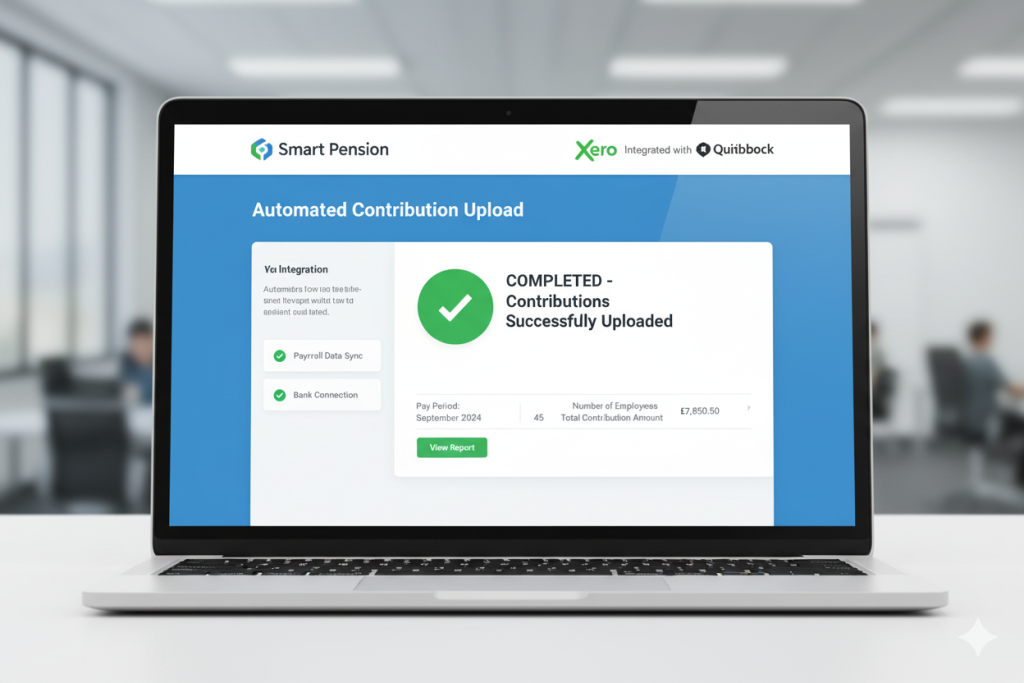
The integration automates:
- Employee data transfer (names, DOB, NI numbers, earnings)
- Contribution calculations
- Upload of monthly contribution files
- Assessment status updates
Without integration, you’re manually exporting data, formatting it correctly, uploading it, and praying you didn’t transpose any numbers. Do that 12 times a year for several years, and errors are inevitable.
For our clients at Ask Accountant, setting up the payroll integration properly is non-negotiable. It’s the difference between compliance being a 10-minute monthly task vs. a multi-hour headache.
What TPR Actually Looks for During Investigations
The Pensions Regulator doesn’t investigate randomly. They target:
- New employers (within first two years of duties start date)
- Employers who haven’t filed declarations
- Businesses with worker complaints
- Industries with historically poor compliance (hospitality, construction, retail)
- Companies flagged by pension providers for late/missing contributions
During an investigation, TPR requests:
- Payroll records
- Pension contribution records
- Assessment documentation
- Communications sent to employees
- Opt-out notices
- Re-enrolment records
They’re looking for:
- Late enrolment: Did you enrol people on time?
- Underpayment: Are contributions calculated correctly?
- Missing contributions: Are payments up to date?
- Failed re-enrolment: Did you complete three-year cycles?
- Prohibited conduct: Have you discouraged opt-ins?
If they find breaches, they’ll issue compliance notices requiring rectification. Fixed penalties follow if you don’t comply. Escalating penalties kick in for persistent non-compliance. Criminal prosecution is rare but reserved for wilful, deliberate failures.
The key to surviving an investigation: meticulous record-keeping. If you can demonstrate you’ve acted in good faith, made reasonable efforts to comply, and corrected errors promptly, TPR is often lenient (relative to their available penalties).
When You Should Outsource This Entirely
Some business owners love systems and processes. They enjoy setting up integrations, monitoring compliance, staying on top of regulatory changes. If that’s you, managing auto enrolment in-house is feasible.
But most business owners just want this handled correctly without consuming their time. That’s when you bring in professionals.
At Ask Accountant, we manage the entire auto enrolment process as part of our payroll and pension services. We handle:
- Scheme setup and provider selection
- Payroll integration
- Monthly contribution uploads
- Compliance monitoring
- Re-enrolment management
- TPR communications and declarations
For businesses in London or nationwide, this removes the compliance risk entirely. You hire employees, we ensure their pensions are sorted correctly. You never see a TPR penalty notice because we’re managing deadlines, calculations, and filings.
The cost of outsourcing is typically £30-£100 monthly depending on employee numbers—far less than a single fixed penalty of £400, let alone escalating daily fines.
If you’re spending more than an hour per month on pension administration, or if you’re anxious about compliance, speak to us. We’ll assess your setup and recommend whether outsourcing makes sense for your situation.
Future Changes: What’s Coming in 2028-2029
The government’s been threatening to expand auto enrolment for years. The Pensions (Extension of Automatic Enrolment) Act 2023 gave them the power to:
- Lower the age threshold from 22 to 18
- Remove the Lower Earnings Limit (so contributions start from the first £1 earned, not £6,240)
These changes were supposed to roll out by now. The Conservative government confirmed intent. The current Labour government said in November 2024 they’re “considering if and when” to implement them.
Translation: probably coming, but timing uncertain.
If/when these changes happen:
Lower age to 18: You’ll need to enrol 18-21 year olds earning above £10,000. This particularly affects retail, hospitality, and entry-level roles. More people to enrol = more administration + higher contribution costs.
Remove LEL: Contributions calculated from £0, not £6,240. Someone earning £15,000 would have contributions on the full £15,000 (up to the upper limit), not £15,000 minus £6,240. This increases contribution costs for both employers and employees.
The salary sacrifice changes from April 2029 (NI on contributions above £2,000) will also impact the attractiveness of SMART pensions. For now, maximise the NI savings while you can.
The Smart Pension Specific Features Worth Knowing
Since this is an auto enrolment smart pension compliance guide, here are Smart Pension-specific features that affect compliance:
Keystone technology platform: Smart’s proprietary tech handles assessments, contributions, and communications automatically. It’s why setup is faster than most competitors.
Mobile app: Employees manage their pensions via app, reducing HR queries. They can view balances, change contributions, access Smart Rewards (discount platform).
Financial wellbeing support: Smart Pension provides members with financial education content. This reduces opt-out rates because employees better understand pension value.
ESG default fund: The Sustainable Growth Fund is the default option. Strong historical performance (check their quarterly investment reports for specifics—they publish returns for all 18 funds).
Master trust structure: This matters for governance. You’re not appointing trustees or managing scheme rules. Smart Pension’s independent professional trustees handle fiduciary duties. Your job is simply ensuring contributions are paid and employees are enrolled correctly.
API access: For larger employers, Smart Pension provides API access for custom integrations. Most small businesses won’t need this, but it’s there.
Consolidation support: If employees have multiple old pensions, Smart Pension facilitates consolidation. This isn’t unique to Smart, but their process is particularly smooth.
Real-World Compliance Failures (And Lessons)
Case 1: The forgotten employee Small marketing agency, seven employees. Hired an eighth person in January. HR set up payroll, issued contract, onboarded properly. Never enrolled them in the pension. Nobody noticed until September when the employee asked about their pension contributions. Agency scrambled to enrol them, backdated eight months of contributions (employer had to cover employee’s share since they’d already been paid net). Cost: ~£800 in backdated contributions plus embarrassment.
Lesson: Automate the enrolment trigger. Your auto enrolment smart pension provider should flag new starters immediately.
Case 2: The payroll misconfiguration SaaS startup using Xero and Smart Pension. Developer set up the integration incorrectly—employee contributions were being deducted from payroll but weren’t uploading to Smart Pension. Contributions accumulated in a phantom holding account for four months. Smart Pension flagged it, startup had to manually reconcile and upload, nearly missed the deadline to avoid late payment penalties.
Lesson: Test your integrations thoroughly. Run a parallel month manually to confirm automation is working.
Case 3: The missed re-enrolment Construction firm, 23 employees. Three-year re-enrolment date came and went. Owner genuinely forgot. TPR sent compliance notice (company ignored it, thinking it was spam). Then fixed penalty notice. Then escalating penalties at £500/day. By the time they engaged professional help, they owed £7,400 in penalties plus the re-enrolment needed completing urgently.
Lesson: Calendar your three-year date prominently. Set alerts. Use a provider that sends reminders.
Case 4: The salary sacrifice NMW breach Restaurant group put all staff on salary sacrifice for pensions. Several employees earning near minimum wage were sacrificed below NMW. HMRC investigated (separate matter), discovered the NMW breach, fined the company and triggered a TPR review of their pension compliance.
Lesson: Check NMW headroom before implementing salary sacrifice. For minimum wage workers, it’s often not feasible.
Your Compliance Checklist
□ Duties start date identified and recorded □ Pension scheme selected and registered □ Payroll software integrated with pension provider □ Workforce assessment process established □ All eligible employees enrolled □ Postponement notices issued (if using postponement) □ Employer and employee contributions calculated correctly □ Monthly contribution uploads automated or scheduled □ Employee communications sent (enrolment packs, scheme info) □ Declaration of compliance filed with TPR □ Three-year re-enrolment date diarised □ Records maintained (payroll, contributions, assessments, communications) □ Opt-out notices processed correctly □ Re-joiners and salary changes monitored □ New starters assessed within required timeframes

Pin this checklist somewhere visible. Review it quarterly. Most compliance breaches happen because someone forgot a step, not because they intentionally violated rules.
| Task | Frequency | Deadline | Consequence of Missing |
|---|---|---|---|
| Assess new starters | Per new employee | Within 3 months of start | Compliance notice, fixed penalty |
| Pay contributions | Every pay period | 22nd of the following month (typically) | Unpaid contributions notice, penalties |
| Re-assess workforce | Every pay period | Ongoing | Late enrolment, backdated contributions |
| File declaration of compliance | One-off (initial) | Within 5 months of duties start | Fixed penalty, escalating penalties |
| Complete re-enrolment | Every 3 years | Within 6-month window | Compliance notice, penalties |
| File re-declaration | Every 3 years | Within 5 months of re-enrolment date | Penalties, investigation |
FAQs: The Questions Everyone Actually Asks
Can I just use NEST since it’s government-backed? Yes. NEST is a solid, compliant option. It’s government-run, which some employers find reassuring. The fees are less competitive than Smart Pension for regular contributors, and the technology is less sophisticated, but it absolutely meets compliance requirements.
What if my employee earns £9,800 one month, then £10,200 the next? You assess them each pay period. The month they hit £10,000 annually (or equivalent for their pay frequency), they become eligible and must be enrolled.
Can employees opt out immediately after I enrol them? Yes, within one calendar month. They receive a full refund of their contributions. You don’t get your employer contributions back, but that’s the system.
Do I need to enrol company directors? Not if the only people working for the company are directors with no employment contracts. This is the “director exemption.” However, if directors have employment contracts or there are non-director employees, the exemption doesn’t apply.
What happens if I can’t afford the pension contributions? This isn’t an acceptable reason to not comply. Auto enrolment is a legal requirement, not optional. If cash flow is genuinely problematic, speak to an accountant who understands business planning—they may identify tax relief or restructuring options.
Can I backdate someone’s employment to avoid enrolling them? No. This is fraudulent. TPR and HMRC share data. If you’re caught, it’s not just pension penalties—you could face tax fraud charges, NMW violations, and employment law breaches. Never attempt this.
What if we have high staff turnover? Use the postponement option. You can postpone assessment for up to three months for new starters. This is specifically designed for businesses with temporary or trial-period workers.
How do I handle someone on maternity leave? They remain enrolled. Their contributions pause during unpaid maternity leave (no earnings = no qualifying earnings to contribute on). When they return and receive earnings above the threshold, contributions resume.
What about zero-hours contract workers? They’re assessed like any employee. In months where their earnings exceed £10,000 annually (roughly £833 monthly), they’re enrolled. In months below that threshold, they’re not.
Wrapping This Up: Your Next Steps
Auto enrolment smart pension compliance isn’t as complex as TPR’s guidance makes it seem, but it’s unforgiving of mistakes. The rules are specific. The penalties escalate quickly. And “I didn’t know” isn’t a defence.
Here’s what you do now:
- If you’re not yet set up: Choose a provider (Smart Pension is excellent for small-to-medium businesses), register your scheme, integrate with payroll, and file your declaration within five months.
- If you’re already enrolled employees but unsure of compliance: Audit your setup. Check contribution calculations, verify everyone eligible is enrolled, confirm your integration is working correctly. If you find gaps, fix them immediately.
- If you’re approaching your three-year re-enrolment: Calendar the exact date, set reminders starting three months before, and plan to complete the process early in the six-month window.
- If you’re overwhelmed: Call us at Ask Accountant on +44(0)20 8543 1991. We’ll review your situation, identify any compliance gaps, and either guide you through corrections or handle it entirely for you. Our office is at 178 Merton High St, London SW19 1AY if you prefer face-to-face discussions.
The goal isn’t perfection. It’s consistent, documented compliance. Do that, and TPR will never trouble you.